


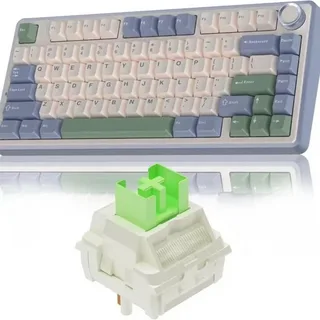
When it comes to mechanical keyboards, one size does not fit all. For those who are looking for a more compact and efficient setup, the 75 keyboard is a popular choice. Combining a sleek design with essential keys, this layout offers a perfect balance between functionality and space-saving. However, to truly make your keyboard stand out, customization is key. In this article, we’ll explore how you can personalize your 75% keyboard with keycaps, switches, and other accessories to enhance your typing experience and make it truly your own.
Why Choose a 75% Keyboard?
Before diving into customization, it’s important to understand why the 75% keyboard layout is so popular. Unlike the full-size keyboard, the 75% layout removes the number pad but keeps the function row, arrow keys, and essential navigation keys. This makes it ideal for those who want a more compact desk setup without sacrificing too much functionality. It’s especially loved by both gamers and professionals for its balance between portability and usability.
Customizing Your 75% Keyboard: Keycaps
The Importance of Keycap Selection
Keycaps are one of the easiest and most visible ways to customize your 75% keyboard. Not only do they affect the aesthetic appeal of your setup, but they also influence the feel and sound of your typing experience. When selecting keycaps, there are a few things to consider:
- Material: Keycaps are typically made from either ABS (Acrylonitrile Butadiene Styrene) or PBT (Polybutylene Terephthalate). ABS keycaps are generally shinier and may wear down over time, while PBT keycaps are more durable and resist fading.
- Profile: Keycaps come in different profiles such as SA, Cherry, or OEM. Each profile has its own height and shape, which can significantly impact typing comfort.
- Design and Color: With a variety of colors, patterns, and even custom designs available, the keycap choice is where you can truly make your 75% keyboard your own. Whether you’re into minimalism or vibrant, retro themes, there’s something for every taste.
Popular Keycap Sets
Some popular keycap sets for 75% keyboards include:
- Ducky One 2 Skyline – A well-known set for its sleek design and durable PBT material.
- GMK Keycaps – A premium choice for those who want a high-end look and feel with excellent sound quality.
- Tai-Hao Keycaps – Known for their affordability and a wide variety of color schemes.
Customizing Your 75% Keyboard: Switches
Understanding Switch Types
Switches are another crucial aspect of customizing your 75% keyboard. The choice of switches directly affects how your keyboard feels and sounds when typing or gaming. Mechanical switches come in various types, each with unique characteristics. The three main categories of switches are:
- Linear: These switches offer a smooth keypress without tactile bumps or clicks. Popular linear switches include Cherry MX Reds and Gateron Reds.
- Tactile: Tactile switches give a noticeable bump at the actuation point, offering more feedback during typing. Cherry MX Browns and Cherry MX Clears are examples of tactile switches.
- Clicky: These switches provide both a tactile bump and an audible click. They’re perfect for those who enjoy loud, satisfying feedback. Cherry MX Blues and Cherry MX Greens are classic clicky switches.
Which Switch Should You Choose?
Choosing the right switch depends largely on your personal preference. If you’re a gamer, linear switches might be a good fit due to their smooth keystrokes and faster actuation times. On the other hand, if you do a lot of typing, tactile switches may offer a more comfortable experience with their feedback. Clicky switches are ideal for those who love the clicky sound and feel, but they might be distracting to others in a shared environment.
Switch Mods for Enhanced Performance
If you want to go the extra mile in customizing your 75% keyboard, consider performing switch mods. For example, lubing your switches can reduce friction, leading to a smoother feel. Adding dampening rings (O-rings) can soften the sound of bottoming out and provide a quieter typing experience.
Customizing Your 75% Keyboard: Other Accessories
Stabilizers
For larger keys like the spacebar, enter, and shift keys, stabilizers help ensure even keystroke registration. Upgrading to high-quality stabilizers, such as Cherry-style or clip-in stabilizers, can improve the overall feel and reduce rattle during keypresses.
Dampening Mods
Adding dampening materials like foam or silicone pads can improve the acoustics of your 75% keyboard. These mods absorb vibrations and can give your keyboard a deeper, more satisfying sound profile.
Cable and Case Customization
Don’t forget to give your keyboard a finishing touch with a custom cable and case. A coiled or braided cable can add style and uniqueness, while a sturdy aluminum or polycarbonate case can affect the weight and feel of your keyboard. The right case can also enhance sound quality, with metal cases typically producing a deeper, more resonant sound.
Conclusion
Customizing your 75% keyboard is an exciting way to enhance both its functionality and appearance. From selecting the right keycaps to choosing the perfect switches, the possibilities for personalization are endless. Whether you’re a gamer looking for faster response times or a typist in search of comfort, customizing your 75% keyboard allows you to tailor it to your specific needs. So, dive in, experiment with different components, and make your keyboard truly yours.
